SmartGen AI Vocal Remover: The Vision Behind 100% Free, Private Audio Stem Splitting
By Sayad Md Bayezid Hosan & the Connect with Bayezid Editorial Team | May 2026
In the dynamic world of digital content creation, the demand for sophisticated yet accessible tools is ever-growing. Musicians, podcasters, video editors, and karaoke enthusiasts all share a common need: the ability to precisely manipulate audio. For too long, this capability has been either prohibitively expensive, riddled with frustrating limitations, or compromised user privacy. This is precisely the challenge that **Sayad Md Bayezid Hosan**, the visionary behind SmartGen Tools, set out to solve with the groundbreaking **AI Vocal Remover**.
This article delves into the philosophy and technical prowess that makes SmartGen's [AI Vocal Remover](https://smartgentools.com/voice-remover/) a game-changer in 2026. We'll explore how it stands out as a truly **free audio stem splitter**, its commitment to user privacy, and the innovative solutions that ensure a seamless experience for everyone, including iPhone users. Join us as we uncover why this tool is rapidly becoming the go-to solution for anyone looking to **separate music and voice online** with unparalleled quality and ease.
The Evolution of Audio Separation: From Manual Labor to AI Magic
Historically, isolating vocals or instruments from a mixed audio track was a complex, time-consuming process. Professional sound engineers would rely on multi-track recordings, or painstakingly attempt to use techniques like phase inversion on stereo mixes. These methods often yielded imperfect results, leaving behind audible artifacts or degrading the overall sound quality. The idea of a **high-quality audio extractor free** seemed like a distant dream.
The advent of Artificial Intelligence (AI) has revolutionized this field. Modern AI models, particularly those based on deep neural networks, can now "understand" the intricate components of a sound wave. They learn to distinguish between different instruments and vocal frequencies, even when they overlap. This leap in technology has paved the way for tools like SmartGen's AI Vocal Remover, making professional-grade audio separation accessible to the masses.
SmartGen's Core Principles: Free, Private, and User-Centric
What truly sets SmartGen's AI Vocal Remover apart from its competitors are the foundational principles upon which it was built:
1. Truly 100% Free, Forever
Many online tools lure users with the promise of "free" services, only to impose hidden costs, subscription walls, or severely limited functionality upon download. SmartGen breaks this cycle. The **AI Vocal Remover** is genuinely **100% free**, with no premium tiers, no credit card requirements, and no watermarks on your processed files. This commitment ensures that everyone, regardless of their budget, can access top-tier audio separation technology.
2. Unwavering Commitment to User Privacy: No Sign-Up, No Data Storage
In an era where data privacy is paramount, SmartGen takes a firm stance. The tool operates on a **no sign-up, no registration** model. You don't need to create an account, provide an email, or share any personal information. Furthermore, and critically, SmartGen employs a **client-side secure audio splitter** approach for initial file handling. This means your original and processed files are never stored on our servers. They are processed on transient cloud endpoints and automatically wiped after your session. Your creative work remains entirely yours, ensuring complete peace of mind.
"We do not store your original or processed files. All audio data is processed on transient cloud endpoints and is automatically wiped once your session ends. We store zero metadata, ensuring your creative work remains yours alone."
— Sayad Md Bayezid Hosan, Developer of SmartGen Tools
3. Seamless Cross-Platform Experience: The iPhone "Greyed Out" Solution
A common frustration for iOS users attempting to use online audio tools is the "Greyed Out" file bug, where audio files in their iPhone's file picker are inaccessible. Sayad Md Bayezid Hosan personally addressed this issue by implementing a unique **Hybrid Code Structure (MIME Type + Extension Fallback)**. This innovative solution ensures that iPhone and iPad users can effortlessly upload their audio and even **video audio voice remover free** files without any compatibility hurdles. This makes SmartGen a truly **web-based stem separation** tool accessible on any device.
The Technical Edge: Demucs v4 Online Splitter
The magic behind SmartGen's exceptional quality lies in its adoption of the **Demucs v4 AI Architecture**. Developed by Meta's AI Research lab, Demucs v4 is a state-of-the-art deep neural network specifically designed for music source separation. Unlike older methods that simply tried to filter frequencies, Demucs v4 has been trained on vast datasets of multi-track studio recordings. This extensive training allows it to:
**Intelligently Distinguish Stems:** It doesn't just cut frequencies; it understands the unique spectral signatures of vocals, drums, bass, and other instruments.
**Minimize Artifacts:** The result is cleaner separation with significantly fewer "ghosting" or "underwater" effects, delivering truly studio-grade output.
**High-Quality Output:** When you use the **Demucs v4 online splitter**, you're leveraging an industry-leading AI model that provides superior separation quality, making it the **best vocal remover for karaoke** and professional sampling.
Unlocking Creative Potential: Diverse Use Cases
The applications for a powerful, **free audio stem splitter** are incredibly diverse. Here are just a few ways the SmartGen AI Vocal Remover empowers creators and enthusiasts:
For Musicians & Producers:
**Instant Karaoke Tracks:** Easily create backing tracks for singing practice, live performances, or cover songs. It's the ultimate **best vocal remover for karaoke** tool.
**Acapella Extraction:** **Extract acapella free** from any song for remixes, mashups, or sampling in new productions. This opens up new avenues for creative sound design.
**Instrumental Isolation:** Need a clean instrumental for a specific project? SmartGen delivers high-quality instrumental tracks without the vocals.
For Content Creators & Podcasters:
**Background Music Removal:** Effortlessly **remove background music from audio** in interviews, vlogs, or recordings to ensure crystal-clear dialogue.
**Voice-Over Enhancement:** Isolate voice tracks to clean up recordings, remove unwanted noise, or prepare them for professional voice-overs.
**Video Audio Separation:** Upload MP4 or MOV video files directly. The tool will automatically extract the audio and perform vocal separation, saving video editors valuable time. This makes it a versatile **video audio voice remover free** solution.
For DJs & Remixers:
**Live Mashups:** Quickly get acapellas and instrumentals to create dynamic live mashups and unique DJ sets.
**Sampling:** Extract specific vocal phrases or instrumental loops for creative sampling in electronic music production.
Meet the Developer: Sayad Md Bayezid Hosan's Vision
The SmartGen AI Vocal Remover is more than just a tool; it's a testament to the vision of **Sayad Md Bayezid Hosan**. His dedication to democratizing access to advanced AI technology is evident in every aspect of the platform. By prioritizing user needs, privacy, and delivering a truly free service, Sayad is building a community around accessible innovation.
His work on fixing the persistent iOS "Greyed Out" bug showcases a deep understanding of user pain points and a commitment to providing robust, cross-platform solutions. This user-centric approach is what makes SmartGen Tools a trusted name among creators.
Explore more of Sayad's projects and insights on his personal website: www.sayadbayezid.com.
Frequent Asked Questions (FAQ) - Your Top Queries Answered
1. What is the SmartGen AI Vocal Remover?
It's a 100% free, online tool that uses advanced AI (Demucs v4) to separate vocals and instruments from any audio or video file, without requiring sign-up or storing user data.
2. Is the SmartGen AI Vocal Remover truly free?
Yes, it is absolutely 100% free. There are no hidden costs, subscriptions, or limitations on downloads.
3. Do I need to sign up or register to use the tool?
No, there is no sign-up or registration required. You can use the tool instantly and anonymously.
4. How does SmartGen ensure my privacy?
SmartGen uses a client-side secure audio splitter approach. Your files are processed on transient cloud endpoints and are automatically wiped after your session. We do not store any user data or files.
5. What is Demucs v4 and why is it important?
Demucs v4 is a cutting-edge AI model developed by Meta's AI Research lab for music source separation. It provides superior quality and cleaner separation compared to older methods, making SmartGen a **high-quality audio extractor free**.
6. Can I use this tool on my iPhone or iPad?
Yes! SmartGen has been specifically optimized to work flawlessly on iOS devices, addressing the common "Greyed Out" file bug found in other online tools.
7. What file formats does it support?
It supports audio files like MP3, WAV, M4A, and video files like MP4, MOV.
8. Can I upload video files to remove vocals or background music?
Absolutely. You can upload MP4 or MOV video files, and the AI will automatically extract the audio and perform the separation.
9. What is the maximum file size I can upload?
Currently, the maximum file size supported is 10MB to ensure fast and efficient processing for all users.
10. How long does the audio separation process take?
Most tracks are processed within 60 to 90 seconds, depending on the file length and current server load.
11. Can I use the separated instrumental tracks for karaoke?
Yes, SmartGen is designed to be the **best vocal remover for karaoke**, providing clean instrumental tracks for your singing pleasure.
12. Is it possible to extract acapella tracks for remixes?
Definitely. You can **extract acapella free** from any song, making it perfect for DJs and music producers looking to create remixes or mashups.
13. Who is Sayad Md Bayezid Hosan?
He is the dedicated developer behind SmartGen Tools, committed to providing free, high-quality AI solutions to the global creator community.
14. Where can I find more information about SmartGen Tools?
You can visit the official tool page at [smartgentools.com/voice-remover/](https://smartgentools.com/voice-remover/) or follow the developer's blog at [connectwithbayezid.blogspot.com](https://connectwithbayezid.blogspot.com/?m=1).
15. Why choose SmartGen over other vocal removers?
SmartGen offers a unique combination of 100% free access, no sign-up, superior privacy, cross-platform compatibility (including iPhone fix), and cutting-edge Demucs v4 AI technology for high-quality results.
16. Can I use the separated audio for commercial projects?
While the tool is free to use, always ensure you have the necessary rights or licenses for the original audio if you intend to use the separated stems for commercial purposes.
17. Does it support multi-stem separation (e.g., drums, bass, vocals)?
Currently, SmartGen focuses on vocal and instrumental separation. Future updates may include more granular stem splitting capabilities.
18. Is there a mobile app for SmartGen AI Vocal Remover?
No dedicated app is needed. SmartGen is a web-based tool fully optimized for mobile browsers, providing a seamless experience on any smartphone or tablet.
19. How can I provide feedback or suggest features?
You can connect with Sayad Md Bayezid Hosan through his personal website or the Connect with Bayezid blog for feedback and suggestions.
20. What makes SmartGen's output quality so high?
The integration of the full **Demucs v4 model**, which is trained on extensive datasets, allows for a more intelligent and accurate separation of audio components, resulting in studio-grade quality.
Conclusion: Empowering Creators, One Stem at a Time
The SmartGen AI Vocal Remover is more than just a technological marvel; it's a statement. It's Sayad Md Bayezid Hosan's commitment to empowering creators worldwide by removing the traditional barriers of cost, complexity, and privacy concerns. By offering a truly **free audio stem splitter** powered by **Demucs v4 online**, SmartGen is setting a new standard for accessibility and quality in audio production.
Whether you're crafting the next viral track, perfecting your karaoke performance, or simply cleaning up an important recording, SmartGen Tools provides the reliable, high-quality solution you need. Experience the future of audio separation today.
Discover proven organic strategies and understand the risks of automation
Understanding the LinkedIn Algorithm
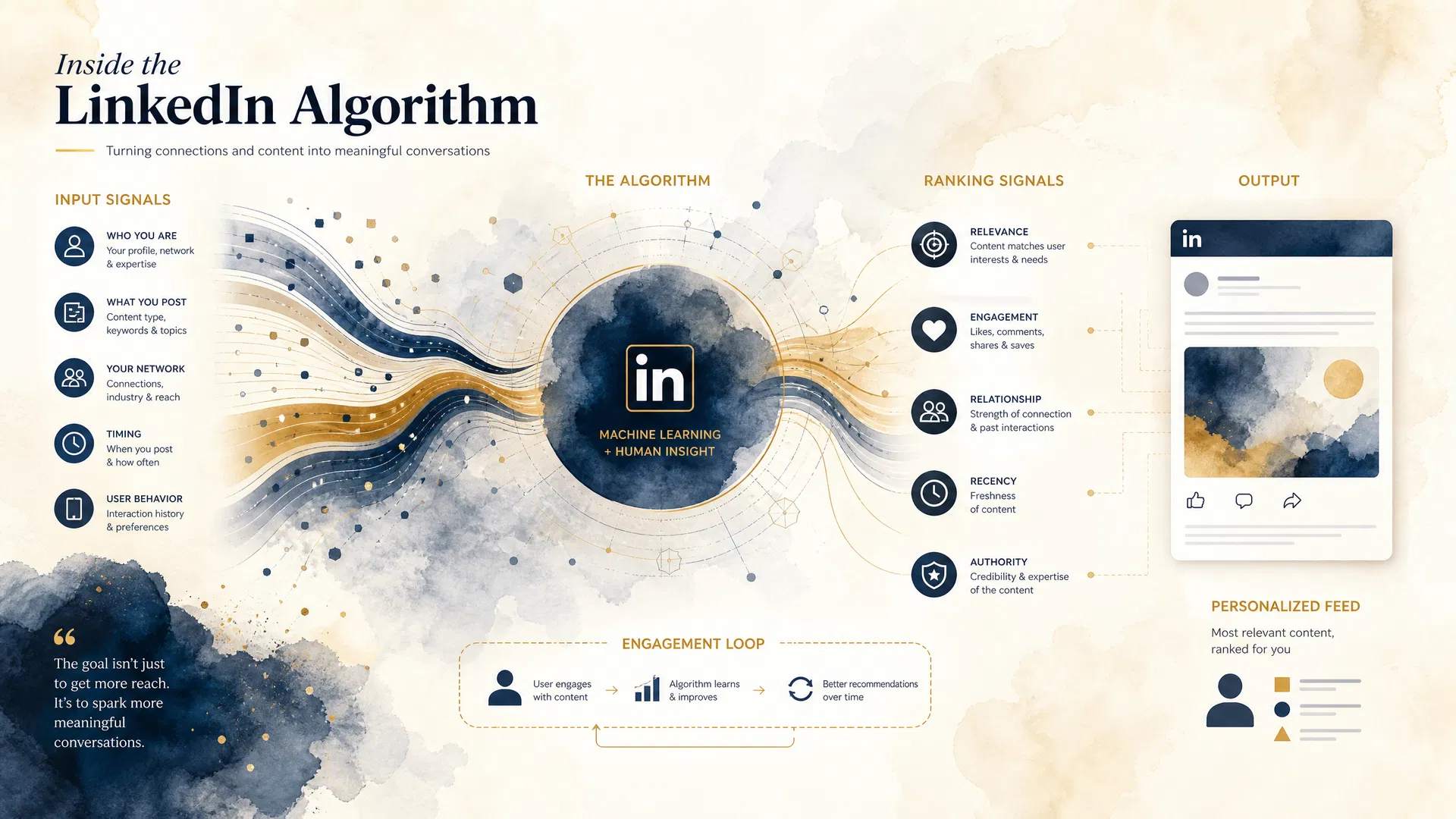
LinkedIn's algorithm is fundamentally different from other social platforms. It's designed to prevent virality and instead prioritize meaningful professional conversations. The platform processes billions of posts daily to create personalized feeds for each user.
How LinkedIn's algorithm processes and ranks content
The algorithm evaluates three core ranking signals: your identity (profile and expertise), the content itself (topic, type, and quality), and member activity (engagement patterns and relevance).
95%
Report declining reach
5x
Video engagement boost
24x
Live video engagement
3-4
Posts per week ideal
Organic Growth Strategies That Work
Build sustainable growth through authentic engagement and value-driven content. These strategies align with LinkedIn's algorithm and create genuine connections.
🎯 Profile Optimization
Optimize your LinkedIn profile with strategic keywords, professional imagery, and a compelling headline to improve discoverability.
Keywords in headline
Professional headshot
Custom URL
Keyword-rich About section
✨ Value-Driven Content
Create actionable, evergreen content that provides immediate value to your audience without asking for anything in return.
Actionable tips
Evergreen insights
Industry trends
How-to guides
💬 Meaningful Engagement
Build authentic relationships through thoughtful comments, genuine interactions, and employee advocacy programs.
Thoughtful comments
Meaningful conversations
Employee sharing
Community participation
📈 Strategic Posting
Maintain consistency with 3-4 quality posts per week, optimized for native content and video formats.
3-4 posts/week
Native content
Video priority
Optimal timing
🎬 Video Content
Leverage video content which generates 5x more engagement than text posts and 24x for live videos.
Regular video posts
Live streaming
Behind-the-scenes
Expert insights
🏆 Build Authority
Establish yourself as an expert by consistently posting about your niche and providing industry insights.
Niche consistency
Expert positioning
Thought leadership
Industry insights
✓ Pro Tip: Content Performance
Posts with imagery get 2x more comments than text-only posts. Documents and carousels often perform best for reach and engagement.
Building authentic connections and sustainable growth on LinkedIn
Understanding Automation Risks
While automation tools promise quick growth, they come with significant risks that can permanently damage your professional presence.
The hidden dangers of LinkedIn automation tools
⚠️ Critical Warning
LinkedIn explicitly prohibits third-party automation in its User Agreement. The platform has sophisticated detection mechanisms that can identify automated behavior patterns, even when tools claim to mimic human activity.
🚫 Account Suspension Risk
LinkedIn explicitly prohibits third-party automation tools. Using them violates their User Agreement and can result in permanent account suspension.
👁️ Shadowbanning & Reach Decline
The algorithm can detect automated behavior and severely limit your content reach without formal notification, making your efforts invisible.
💔 Reputation Damage
Robotic or spammy interactions alienate your network, damage credibility, and undermine the authentic relationships that drive real growth.
Best Practices for Safe Growth
✓ Do This
Post 3-4 high-quality pieces per week
Focus on native content (text, carousels, videos)
Engage meaningfully with comments
Build topic authority in your niche
Use video content to maximize engagement
Monitor analytics and adjust strategy
✗ Avoid This
Use third-party automation tools
Engage in "engagement pods"
Post engagement bait content
Use automated connection requests
Rely on external links
Ignore LinkedIn's community policies
Frequently Asked Questions
How long does it take to see results with organic growth?▼
Organic growth on LinkedIn typically takes 3-6 months to show significant results. However, you'll start seeing engagement improvements within the first 2-4 weeks if you're posting consistently and engaging meaningfully. The key is to stay committed to the strategy and not expect overnight success. Remember, LinkedIn values quality over quantity, so focus on creating valuable content rather than posting frequently.
What type of content performs best on LinkedIn?▼
Based on 2025 data, video content performs best with 5x more engagement than text posts. Live videos get 24x more engagement. After video, the top performers are: (1) Carousels and documents with actionable insights, (2) Native text posts with personal stories, (3) Posts with professional images, (4) Industry trends and analysis. Avoid external links in the main post - place them in comments instead.
How often should I post on LinkedIn?▼
The sweet spot is 3-4 quality posts per week. This frequency is enough to maintain visibility without overwhelming your audience. Consistency matters more than volume - it's better to post 3 times weekly consistently than to post daily for a week and then disappear. Quality should always be your priority. Each post should provide value to your audience, whether it's educational, inspirational, or entertaining.
What are the risks of using LinkedIn automation tools?▼
The risks are severe and include: (1) Account suspension - LinkedIn explicitly prohibits third-party automation, (2) Shadowbanning - your reach can be limited without notification, (3) Reputation damage - automated interactions appear robotic and unprofessional, (4) Wasted investment - the account could be suspended before you see ROI. LinkedIn has sophisticated detection systems that can identify automated behavior patterns. It's simply not worth the risk.
How do I optimize my LinkedIn profile for better reach?▼
Profile optimization includes: (1) Use keywords in your headline and About section, (2) Add a professional headshot with good lighting, (3) Create a custom LinkedIn URL, (4) Write a compelling About section that includes your expertise and value proposition, (5) List your skills and endorsements, (6) Add a banner image that reflects your brand, (7) Include links to your website or portfolio, (8) Keep your experience section up-to-date. These elements help LinkedIn's algorithm understand your expertise and show your profile to relevant users.
How can I increase engagement on my posts?▼
To increase engagement: (1) Start with a compelling hook in the first line, (2) Use line breaks to make content scannable, (3) Ask genuine questions that invite responses, (4) Share personal stories and insights, (5) Use relevant hashtags (5-10 is ideal), (6) Respond to every comment within the first hour, (7) Tag relevant people (but don't overdo it), (8) Use images or videos, (9) Avoid engagement bait like "Comment YES if you agree", (10) Focus on providing value rather than self-promotion. Remember, meaningful conversations drive the algorithm more than vanity metrics.
What is "topic authority" and how do I build it?▼
Topic authority means LinkedIn recognizes you as an expert in a specific area. To build it: (1) Consistently post about your niche or expertise area, (2) Share original insights and research, (3) Engage with other experts in your field, (4) Use specific keywords related to your expertise, (5) Create in-depth content on your topics, (6) Build a portfolio of quality posts over time. Once you establish topic authority, LinkedIn will show your content to more people interested in that topic, significantly boosting your reach and follower growth.
Should I use paid LinkedIn ads alongside organic growth?▼
A hybrid approach works best. Organic growth builds long-term, sustainable engagement and credibility. Paid ads provide quick visibility and can validate your messaging. Use paid ads to: (1) Amplify your best-performing organic content, (2) Reach specific target audiences, (3) Test new content formats, (4) Drive traffic to your website or landing pages. However, don't rely solely on paid ads. The combination of organic and paid strategies gives you the best results - organic for sustainability and paid for acceleration.
How do I measure success on LinkedIn?▼
Key metrics to track: (1) Follower growth rate - aim for 5-10% monthly growth, (2) Engagement rate - likes, comments, shares as a percentage of impressions, (3) Reach - how many people see your content, (4) Click-through rate - if linking to external content, (5) Conversation quality - meaningful comments vs. generic ones, (6) Profile views - indicates growing interest, (7) Connection requests - quality connections from your target audience. Focus on engagement quality over vanity metrics. A post with 50 meaningful comments is more valuable than one with 500 likes.
Ready to Grow Your LinkedIn Presence?
Start implementing these organic growth strategies today. Build authentic connections, share valuable content, and watch your influence grow sustainably.
The Silent Threat: A Masterclass in Situational Awareness and Survival for Women
"Fear is a reaction. Courage is a decision. In the split second between safety and danger, your mind is your greatest weapon. This isn't just a story; it's a blueprint for survival in an unpredictable world."
In today's world, personal safety for women has become a paramount concern. With personal safety fears at a three-decade high in the United States, understanding how to navigate dangerous environments is no longer optional—it's essential. Whether you are walking alone at night or navigating a deserted street, the ability to maintain situational awareness can be the difference between becoming a victim and becoming a survivor.
The Anatomy of a Survival Story: When Instinct Meets Action
Imagine the scene: a deserted road, the heavy silence of midnight, and the rhythmic sound of your own footsteps. This is the setting for our real-life survival story. A young woman, alone and vulnerable, suddenly hears the ominous rumble of a motorcycle. In that moment, the "silent threat" becomes a terrifying reality. This scenario is one that many women fear when walking alone, and it serves as a stark reminder that vigilance is our first line of defense.
The rider, a shadowy figure, begins to close the distance. This is where survival instincts kick in. The girl doesn't freeze; she reacts. Her heart pounds, her breath quickens, but her mind remains sharp. She scans her surroundings for an escape route—a critical component of self-defense for women. When traditional exits are blocked, resourcefulness becomes the key to survival.
The Power of Quick Thinking: Hiding in Plain Sight
As the threat escalates, the girl spots a pile of large, black trash bags. To most, it's just refuse. To her, it's a sanctuary. In a moment of sheer desperation and brilliant quick thinking, she decides to hide. This isn't just about physical strength; it's about mental resilience and the ability to use your environment to your advantage.
The situation intensifies as more motorcyclists arrive. Their intentions are clearly malicious, their behavior aggressive. They are predators on the hunt, scanning the area with chilling focus. They pass the trash pile multiple times, inches away from her hiding spot. This part of the story highlights the psychological toll of being hunted and the absolute necessity of maintaining composure under extreme pressure. How to stay safe in dangerous situations often comes down to the ability to remain invisible when you cannot fight.
The Ultimate Concealment: A Lesson in Courage
In the climax of this motivational survival story, the girl takes a step that requires remarkable courage. She climbs inside one of the trash bags, sealing herself within. She transforms herself into an object of no interest to the criminals. Her actions are precise, her breathing controlled. The criminals pass right by her, their search thwarted by her ingenious act of concealment.
This is a masterclass in situational awareness for women. It shows that survival isn't always about confrontation; often, it's about outsmarting the threat. By staying calm and thinking strategically, she turned a life-threatening situation into a story of triumph. This is the essence of women's empowerment and safety—the realization that you have the power to protect yourself through intelligence and presence of mind.
Actionable Safety Tips: How to Protect Yourself Today
While we hope you never find yourself in such a situation, being prepared is vital. Here are some women's safety tips that every person should know:
Trust Your Gut: If something feels wrong, it probably is. Your intuition is a powerful survival tool.
Maintain Situational Awareness: Put your phone away. Look around. Know who is behind you and what is in front of you.
Identify "Safe Havens": Always be aware of where you can go if you are being followed—a bright store, a populated area, or even a clever hiding spot.
Carry Personal Safety Tools: Consider personal safety alarms or safety keychains as an added layer of protection.
Learn Basic Self-Defense: Knowing self-defense techniques can give you the confidence to act decisively.
The Motivational Mindset: Overcoming Fear and Anxiety
Survival is as much about the mind as it is about the body. Overcoming fear and anxiety in the face of danger requires a specific mindset. You must believe that you are capable of saving yourself. This story is a testament to human resilience. It teaches us that even when the odds are stacked against us, we can overcome anything if we stay calm and think smart.
In the USA, where crime awareness is a major topic of discussion, stories like this serve as educational tools. They remind us that we are not helpless. By sharing these high-value survival stories, we build a community of aware and empowered individuals. The goal is to move from a state of fear to a state of preparedness.
Conclusion: Stay Calm, Think Smart, Survive
The girl in the video emerged from her hiding spot with a sense of relief, but also with a profound lesson. She survived because she didn't let panic take over. She used her environment, her instincts, and her courage to outwit a group of aggressive predators. This is the message we want to leave you with: **Stay calm, think smart, and you can overcome anything.**
As you navigate your daily life, remember that your safety is in your hands. Stay informed, stay aware, and stay empowered. For more motivational content and safety strategies, subscribe to our blog and join the conversation on women's safety in the USA.
Share This Story to Save a Life
Knowledge is power. By sharing this survival awareness story, you could be providing someone with the exact tip they need to stay safe. Let's build a safer world together.
Keywords: Women's safety tips, personal safety for women, situational awareness, survival stories, self-defense for women, walking alone at night safety, real-life survival stories, overcoming fear, motivational stories, USA safety trends 2024.
This guide is based on an original technical project developed by Sayad Md Bayezid Hosan. The automation workflow and video demonstration are part of his official portfolio.
In 2026, the digital landscape has moved beyond the "app for that" era. We are now firmly entrenched in the "message for that" era. For businesses in the United States, the WhatsApp Business API has not just become a tool, but the primary engine driving customer engagement, lead generation, and sales conversions. It's actively replacing traditional email funnels and static landing pages, offering a direct, personalized, and highly effective communication channel.
This guide is meticulously crafted to serve as your definitive A-Z manual, whether you're a budding developer just starting your journey or a seasoned architect looking to optimize enterprise-level solutions. We'll provide you with the exact blueprints, best practices, and strategic insights derived from real-world, high-scale production environments.
The shift is driven by a fundamental change in consumer behavior. In the USA, the average person checks their phone an astonishing 96 times a day. Emails are often buried under an avalanche of spam, and mobile apps are frequently deleted to conserve precious storage space. But a WhatsApp message? It commands attention. It boasts an unparalleled 98% open rate, with a staggering 90% of those messages being read within the first 30 minutes of receipt. This isn't merely a communication tool; it's a direct, high-priority conduit to your customer's attention, trust, and ultimately, their business.
2. What is the WhatsApp Business API? (The Deep Dive)
To truly harness its power, it's crucial to understand that the WhatsApp Business API is fundamentally different from the standard WhatsApp Business App. While the app is a fantastic tool for small local businesses to manage customer interactions manually, the API is an enterprise-grade, programmable interface meticulously designed for medium to large organizations. It's the robust infrastructure that allows for scalable, automated, and integrated communication strategies.
Key Technical Capabilities & What They Mean for Your Business:
Unlimited Broadcasts: Imagine sending critical updates, marketing promotions, or personalized offers to hundreds of thousands of users simultaneously. The API enables this at scale, without the risk of being flagged as spam, provided you meticulously adhere to Meta's stringent messaging policies. This capability is a game-changer for mass communication and targeted campaigns.
Multi-Agent Support: Forget the limitations of a single customer service representative. The API allows you to connect your entire support ecosystem—be it 10, 100, or even 1000 human agents—to a single, official WhatsApp business number. This ensures seamless handover, consistent customer experience, and efficient team collaboration, regardless of the query volume.
Automation & Advanced AI Integration: This is where the magic truly happens. The API is built to integrate with sophisticated Artificial Intelligence (AI) agents. These aren't just simple chatbots; they are intelligent entities capable of understanding complex natural language, reasoning through intricate scenarios, and executing a wide array of tasks autonomously. From answering FAQs to processing orders, these AI agents can handle up to 90% of routine customer interactions, freeing up your human team for more complex, high-value tasks.
Official Verification (The Green Tick): Building trust is paramount in digital commerce. The coveted "Green Tick" verification next to your business name on WhatsApp is a powerful symbol of authenticity and credibility. It signals to US consumers that your business is legitimate and officially recognized by WhatsApp, significantly enhancing customer confidence and engagement.
Interactive Messages & Rich Media: Move beyond plain text. The API supports a rich array of interactive message types, including:
Buttons: Quick reply buttons and call-to-action buttons for guided conversations.
Lists: Presenting multiple options in an organized, scrollable list format.
Carousels: Showcasing products or services with images, descriptions, and call-to-action buttons in a visually appealing, swipeable format.
Media: Sending images, videos, documents, and voice notes to enrich communication.
These features allow you to create an engaging, app-like experience directly within the WhatsApp chat interface, leading to higher interaction rates and better customer satisfaction.
3. Why Automate? The ROI Case for 2026
In the fiercely competitive US market of 2026, automation is no longer a strategic advantage; it's a fundamental requirement for survival and growth. Customer expectations have soared, demanding instant gratification and personalized experiences. If your business can't respond within minutes, you're not just losing a lead; you're losing a potential long-term customer to a competitor who can.
The Numbers That Drive Business Growth:
99% Open Rates: This statistic alone is a testament to WhatsApp's unparalleled reach. Compare this to the dismal 20% average open rate for email marketing campaigns. A message sent via WhatsApp is almost guaranteed to be seen, ensuring your critical communications cut through the noise.
45% Cost Reduction: Implementing AI-powered WhatsApp automation can lead to significant operational cost savings. By deploying intelligent AI agents to handle routine queries, frequently asked questions, and basic support tasks, your human customer service team can be reallocated to focus on more complex issues, high-value sales opportunities, and strategic initiatives. This optimization directly impacts your bottom line.
3.5x Conversion Lift: Conversational commerce funnels, powered by the WhatsApp API, consistently outperform traditional web-based funnels. The direct, interactive, and personalized nature of WhatsApp conversations fosters a stronger connection with the customer, guiding them seamlessly through the sales journey and resulting in significantly higher conversion rates.
70% AI Resolution Rate: Advanced AI agents, especially those leveraging Retrieval-Augmented Generation (RAG) techniques, are now capable of resolving up to 70% of customer support tickets without any human intervention. This dramatically reduces response times, improves customer satisfaction, and allows your human agents to focus on the 30% of complex cases that truly require empathy and nuanced problem-solving.
Reduced Customer Churn: By providing instant, 24/7 support and proactive communication, businesses can significantly improve customer satisfaction. Happy customers are loyal customers, leading to reduced churn rates and increased lifetime value.
Enhanced Personalization: AI agents can leverage customer data to deliver highly personalized messages, product recommendations, and support. This level of personalization, delivered in real-time, creates a superior customer experience that builds brand loyalty.
4. Cloud API vs. On-Premises: The Architect's Choice
When embarking on your WhatsApp Business API journey, one of the first critical architectural decisions you'll face is choosing between Meta's Cloud API and an On-Premises setup. In 2026, the landscape has largely shifted, with the Cloud API emerging as the dominant and recommended choice for the vast majority of businesses.
Cloud API (The Modern Standard & Meta's Recommendation):
What it is: The Cloud API is a fully managed service hosted directly by Meta. Your WhatsApp Business Account is connected to Meta's infrastructure, and all message routing and processing occur within their cloud environment.
Pros:
Zero Hosting Costs: Meta covers the infrastructure costs, eliminating the need for you to manage servers.
Managed by Meta: All server maintenance, security updates, and infrastructure scaling are handled by Meta. This significantly reduces your operational overhead and technical debt.
Instant Updates & New Features: You automatically benefit from the latest features, security patches, and API improvements as soon as Meta rolls them out, without any manual intervention.
High Reliability & Scalability: Meta's global infrastructure is designed for extreme reliability and can automatically scale to handle massive message volumes, ensuring your communication remains uninterrupted even during peak periods.
Simplified Setup: Getting started is significantly faster and easier, as you don't need to provision or configure any servers.
Cons:
Less Control over Data Residency: While Meta offers regional hosting options (e.g., within the US), some highly regulated industries or privacy-sensitive organizations might prefer absolute control over where their data resides. However, for most businesses, Meta's compliance with global data protection regulations (like GDPR and CCPA) is sufficient.
Dependency on Meta: You are reliant on Meta's uptime and service availability. While generally excellent, any Meta-side issues could impact your service.
On-Premises (The Legacy/Niche Choice):
What it is: With an On-Premises setup, you host the WhatsApp Business API client software on your own servers, either in your data center or on a private cloud (e.g., AWS EC2, Google Cloud Compute, Azure VMs). You are responsible for managing the entire infrastructure.
Pros:
Full Control over Data Residency: This is the primary reason businesses choose on-premises. You have absolute control over where your data is stored and processed, which is critical for industries with stringent data sovereignty requirements.
Customization & Flexibility: More granular control over the environment and potential for deeper integrations with existing legacy systems.
Cons:
Higher Costs: You bear all the costs associated with server provisioning, maintenance, scaling, and security.
Increased Operational Overhead: Requires dedicated DevOps and IT resources to manage the infrastructure, apply updates, and ensure uptime.
Manual Updates: You are responsible for manually updating the API client software to benefit from new features and security patches.
Complex Scaling: Scaling an on-premises solution to handle fluctuating message volumes can be complex and resource-intensive.
Architect's Recommendation for 2026: For 99% of businesses, especially those targeting the US market, the WhatsApp Cloud API is the superior choice. Its ease of use, scalability, reliability, and reduced operational burden make it the most efficient and future-proof solution. Only consider an on-premises deployment if you have extremely specific and non-negotiable data residency requirements that cannot be met by Meta's regional Cloud API offerings.
🎧 AUDIO
Listen to Part 2 (Deep Dive)
Continue listening! Play this audio to understand the technical setup and strategies.
5. Technical Deep Dive: The Multi-Agent Workflow (Illustrated)
This section is the beating heart of my project and the blueprint for building resilient, intelligent WhatsApp automation. Instead of a monolithic, single-purpose chatbot, we embrace a Multi-Agent Orchestration model. This architectural pattern is how senior developers design systems that are robust, scalable, and capable of handling complex, nuanced customer interactions without breaking.
The Pipeline Architecture (Visualized & Explained):
Imagine a highly efficient digital factory where each station has a specialized role. That's your multi-agent workflow.
1. The WhatsApp Trigger (The Entry Point):
What it is: This is the initial event that kicks off the entire automation. When a user sends any message to your WhatsApp Business number, Meta's servers detect it.
How it works: Meta then sends an HTTP POST request (a webhook) containing the message payload to a predefined endpoint on your server. This webhook is the signal that a new conversation has begun or an existing one has been updated.
Key Consideration: Your server must be publicly accessible via HTTPS and configured to receive these webhooks. This is where security begins.
2. Data Ingestion & Structured Output Parser (The Interpreter):
What it is: The raw, unstructured message from the user is fed into an intelligent parsing layer. This layer, often powered by a Large Language Model (LLM), is responsible for extracting meaningful, structured data.
How it works: The parser identifies:
User Intent: What does the user want? (e.g., "Check order status," "Product inquiry," "Technical support").
Sentiment: Is the user happy, frustrated, or neutral?
Entities: Key pieces of information like order numbers, product names, customer IDs, dates, etc.
Example Output: If a user says, "Where is my order #12345?", the parser might output {"intent": "order_status", "order_id": "12345"}.
Tools: OpenAI Function Calling, Google Gemini Function Calling, custom NLP models.
3. The Orchestrator (AI Agent 1 - The Brain):
What it is: This is the central intelligence of your multi-agent system. The Orchestrator receives the structured output from the parser and, based on the identified intent, decides which specialized sub-agent or external tool needs to be activated.
How it works: It acts like a project manager, routing tasks to the most appropriate expert. It maintains conversational context and ensures a smooth flow between different functionalities.
4. Specialized Sub-Agents & External Tools (The Experts):
Inventory Agent:
Role: Handles all queries related to product availability and stock levels.
Integration: Connects directly to your e-commerce platform's API (Shopify, WooCommerce, Magento) or your internal SQL/NoSQL database.
Example: If the Orchestrator identifies an inventory_check intent for "blue t-shirt," this agent queries the database and returns the stock count.
Order Management Agent:
Role: Processes new orders, tracks existing orders, and handles returns/exchanges.
Integration: Communicates with your Order Management System (OMS) or directly with e-commerce platform APIs.
Example: For an order_status intent with order_id: 12345, this agent fetches the real-time status and shipping information.
Support Agent (RAG - Retrieval-Augmented Generation):
Role: Provides accurate, context-aware answers to complex customer support questions that aren't easily handled by simple FAQs.
Integration: Leverages a Vector Database (e.g., Pinecone, Supabase, Weaviate) where your internal knowledge base (documentation, manuals, past support tickets) is stored as embeddings. The agent retrieves relevant information and then uses an LLM to generate a coherent answer.
Example: For a technical_support intent about "troubleshooting Wi-Fi connection," this agent retrieves relevant articles from your knowledge base and synthesizes a step-by-step solution.
HTTP Requests & External APIs:
Role: The system can trigger virtually any external action or integrate with third-party services.
Examples: Updating a CRM (Salesforce, HubSpot), sending customer data to an analytics platform, initiating a refund process, or even sending a voice message for transcription via a dedicated API.
5. Response Generation & WhatsApp API (The Communicator):
What it is: Once the relevant information is gathered or the action is performed by the sub-agents, the Orchestrator synthesizes a clear, concise, and personalized response.
How it works: This response is then formatted (e.g., with interactive buttons or rich media) and sent back to the user via the WhatsApp API.
Key Consideration: The response must adhere to WhatsApp's messaging policies, especially regarding the 24-hour customer service window.
🚀 Pro Tip: Embrace Modularity!
The beauty of a multi-agent system lies in its modularity. Don't try to build one "god-bot" that does everything. Instead, create specialized AI agents for specific tasks (e.g., one for sales, one for support, one for marketing). This makes your system more reliable, easier to debug, and infinitely more scalable. Each agent can be developed, tested, and deployed independently, reducing complexity and accelerating development cycles.
6. Step-by-Step Installation & Setup Guide (A-Z for Developers)
This section is your hands-on guide, meticulously detailing every step required to get your WhatsApp Business API automation up and running. Whether you're a fresher eager to learn or a senior developer looking for a comprehensive checklist, follow these phases precisely.
Phase 1: Meta Developer Portal Setup (The Foundation)
Why: This portal is your gateway to all Meta APIs, including WhatsApp. It's where you'll manage your apps, access tokens, and configure webhooks.
2. Create a New Business App:
From the dashboard, click on "My Apps" -> "Create App." Select the app type (e.g., "Business" or "Other"). Provide a display name for your app (e.g., "My WhatsApp Automation").
Why: The app acts as a container for your WhatsApp integration and other Meta products you might use.
3. Add the WhatsApp Product to Your App:
Once your app is created, go to its dashboard. Under "Add Products to Your App," find "WhatsApp" and click "Set up."
Why: This links your app to the WhatsApp Business Platform, giving you access to its features and settings.
4. Verify Your Meta Business Account:
This is a crucial step for moving beyond the sandbox (test) environment to a live production setup. In your WhatsApp product settings, navigate to "Configuration" or "Settings" and look for "Business Verification." Follow the prompts to submit your business documents (e.g., business registration, utility bills). This process can take a few days.
Why: Meta requires business verification to ensure legitimate use of the API and to prevent spam. Without it, you'll be limited to sending messages to a small number of test recipients.
Phase 2: Phone Number Integration (Your Digital Identity)
1. Select a Phone Number:
Choose a phone number that is NOT currently associated with any personal WhatsApp account or WhatsApp Business App.
Why: Once a number is registered with the WhatsApp Business API, it can no longer be used on the consumer or business app. It becomes exclusively an API number.
2. Complete OTP Verification:
Meta will send a One-Time Password (OTP) to the chosen phone number via SMS or voice call. Enter this OTP in the Meta Developer Portal to verify ownership of the number.
Why: This confirms that you legitimately own the phone number you intend to use for your WhatsApp Business API.
3. Set Up Your Display Name:
Provide a clear and recognizable display name for your business (e.g., "Acme Corp Support"). Crucially, this display name must follow Meta's strict branding guidelines. Avoid generic terms, all caps, or excessive punctuation. It should accurately represent your business.
Why: The display name is what users will see when they receive messages from your business. A professional and compliant display name is essential for building trust and getting the coveted "Green Tick."
Phase 3: Webhook Configuration (The Real-Time Listener)
1. Set Up a Secure Server (HTTPS):
You need a publicly accessible server that can receive HTTP POST requests. This can be a Node.js Express app, a Python Flask/Django app, a PHP Laravel app, or any other web server technology. Crucially, this server must use HTTPS (SSL/TLS encryption). Meta will not send webhooks to insecure HTTP endpoints.
Why: Webhooks are the mechanism by which Meta notifies your application of incoming messages, status updates, and other events. An insecure endpoint is a major security vulnerability.
2. Configure the Webhook URL in the Meta Portal:
In your WhatsApp product settings within the Meta Developer Portal, navigate to the "Webhooks" section. Enter the URL of your server's endpoint that will receive the webhooks (e.g., https://yourdomain.com/webhook).
Why: This tells Meta where to send the event notifications.
3. Verify the Token to Establish a Secure Handshake:
When configuring the webhook, you'll provide a "Verify Token" (a secret string of your choice). Meta will send a GET request to your webhook URL with a hub.verify_token parameter. Your server must respond with the hub.challenge parameter if the hub.verify_token matches your secret.
Why: This handshake process ensures that your server is legitimate and authorized to receive webhooks from Meta, preventing unauthorized parties from receiving your WhatsApp data.
⚠️ Warning: Webhook Security is Paramount!
Your webhook endpoint is a critical component. It must be secured against unauthorized access and denial-of-service attacks. Always validate incoming requests, use strong verify tokens, and consider implementing IP whitelisting if possible. A compromised webhook can lead to data breaches or service disruptions.
7. Advanced AI Integration: RAG & Multi-Agent Systems
To elevate your WhatsApp automation from a basic chatbot to a "Senior Level" intelligent system, you must move beyond simple rule-based responses and embrace Retrieval-Augmented Generation (RAG) and Multi-Agent Architectures. This is how you build systems that can truly understand, reason, and provide accurate, context-aware responses without hallucinating.
Retrieval-Augmented Generation (RAG): The Key to Factual Accuracy
The Problem: Large Language Models (LLMs) are powerful but can sometimes "hallucinate"—generating plausible but factually incorrect information. They also lack real-time access to your specific, proprietary business data (e.g., your latest product catalog, internal policies, or customer-specific information).
The Solution (RAG): RAG combines the generative power of LLMs with the factual accuracy of external knowledge bases. Instead of relying solely on the LLM's pre-trained knowledge, the system first retrieves relevant information from your private data sources and then augments the LLM's prompt with this retrieved context. The LLM then generates a response based on this fresh, accurate information.
The RAG Stack for WhatsApp AI Agents:
1. Data Ingestion & Chunking:
Your proprietary data (PDFs, documentation, FAQs, CRM notes, product manuals) is broken down into smaller, manageable chunks. This ensures that the retrieval process is efficient and accurate.
2. Embeddings Generation:
These text chunks are converted into numerical representations called "embeddings." Embeddings capture the semantic meaning of the text. Recommended Tool: OpenAI's text-embedding-3-small or text-embedding-3-large models are currently industry standards for generating high-quality embeddings.
3. Vector Database Storage:
The generated embeddings, along with their corresponding text chunks, are stored in a specialized database designed for fast similarity searches. Recommended Tools: Pinecone, Supabase (with pgvector), Weaviate, or Milvus. These databases allow the system to quickly find the embeddings that are most similar to the user's query.
4. The Retrieval Process:
When a user asks a question on WhatsApp (e.g., "What is your return policy for electronics?"), the system converts this query into an embedding. It then searches the Vector Database for the most similar embeddings (the chunks of text that contain the answer).
5. Augmented Generation:
The retrieved text chunks (the context) are combined with the user's original query and sent to the LLM (e.g., GPT-4o or GPT-4.1-mini). The LLM is instructed to answer the user's question only using the provided context. This ensures the response is accurate, relevant, and grounded in your proprietary data.
Multi-Agent Systems: Orchestrating Complexity
While RAG handles knowledge retrieval, a Multi-Agent System (MAS) handles complex workflows and task execution. As illustrated in the workflow diagram earlier, a MAS involves multiple specialized AI agents working together under the direction of an Orchestrator.
The Orchestrator: This is the central brain. It receives the user's intent and decides which specialized agent is best equipped to handle the request. It manages the conversation flow and ensures a seamless experience.
Specialized Agents: These are the "experts." You might have an Inventory Agent that queries your database, an Order Agent that interacts with your e-commerce platform, and a Support Agent that utilizes the RAG pipeline.
Why MAS? This modular approach makes your system more robust, easier to debug, and highly scalable. Instead of one massive, complex prompt trying to do everything, you have smaller, focused prompts for specific tasks.
8. Scaling & Rate Limits: Moving from 250 to Unlimited
Meta implements strict messaging limits to protect users from spam and ensure a high-quality experience on the WhatsApp platform. Understanding and managing these limits is crucial for scaling your enterprise operations.
Understanding the Tier System
When you first register a phone number with the WhatsApp Business API, you are placed in Tier 250. This means you can initiate conversations with a maximum of 250 unique users within a rolling 24-hour period.
The tiers progress as follows:
Tier 250: 250 unique users per 24 hours.
Tier 2,000: 2,000 unique users per 24 hours.
Tier 10,000: 10,000 unique users per 24 hours.
Tier 100,000: 100,000 unique users per 24 hours.
Unlimited: No limit on the number of unique users you can message.
How to Scale Your Limits
Scaling your messaging limits involves a combination of business verification, maintaining high message quality, and demonstrating consistent usage.
1. Verify Your Business (The First Step):
The most immediate way to move from Tier 250 to Tier 2,000 is to complete the Business Verification process in the Meta Business Manager. This proves to Meta that you are a legitimate entity.
2. Maintain High Message Quality:
Meta constantly monitors the quality of your messages based on user feedback (e.g., blocks, reports of spam). If your quality rating drops, your messaging limits may be reduced, or your number could be flagged. Best Practice: Only send messages to users who have explicitly opted in. Ensure your messages are relevant, timely, and valuable. Avoid overly promotional or aggressive language.
3. Automatic Scaling (The Path to Unlimited):
Once you reach Tier 2,000, Meta employs an automatic scaling mechanism. The Criteria: If you consistently send high-quality messages and utilize at least 50% of your current messaging limit within a 7-day period, Meta will automatically upgrade you to the next tier. Example: If you are in Tier 2,000 and you send high-quality messages to 1,000 unique users within a week, you will be automatically upgraded to Tier 10,000.
Rate Limiting (Technical Constraints)
In addition to the 24-hour unique user limits, Meta also imposes technical rate limits on the API to prevent system overload.
Cloud API Rate Limits: The Cloud API generally supports up to 80 messages per second per phone number.
Handling Rate Limits: Your backend system must be designed to handle 429 Too Many Requests errors gracefully. Implement exponential backoff strategies to retry failed requests without overwhelming the API.
9. Security & Compliance: The Enterprise Standard
When operating at an enterprise scale, especially in the US market, security and compliance are not optional; they are foundational requirements. The WhatsApp Business API provides robust security features, but you must also implement best practices on your end.
End-to-End Encryption
WhatsApp is renowned for its end-to-end encryption. Messages sent between users and the WhatsApp Business API are encrypted, ensuring that only the sender and the recipient can read them. Meta cannot read the contents of these messages.
Data Privacy and Compliance (GDPR, CCPA, HIPAA)
Opt-In Requirements: This is the golden rule of WhatsApp marketing. You MUST obtain explicit, verifiable consent (opt-in) from a user before sending them any proactive, business-initiated messages (e.g., marketing promotions, updates). This consent must be gathered outside of WhatsApp (e.g., via a website form, SMS, or email).
Data Residency: For businesses with strict data sovereignty requirements, Meta offers regional Cloud API endpoints. This allows you to ensure that your data is processed and stored within specific geographic regions (e.g., the US or Europe).
HIPAA Compliance: If you operate in the healthcare sector in the US, you must ensure that your use of the WhatsApp API complies with the Health Insurance Portability and Accountability Act (HIPAA). This involves implementing strict access controls, audit logs, and ensuring that Protected Health Information (PHI) is handled securely.
Securing Your Infrastructure
Webhook Security: As mentioned earlier, your webhook endpoint must be secured with HTTPS and verify tokens.
Access Controls: Implement strict Role-Based Access Control (RBAC) within your organization to ensure that only authorized personnel have access to the Meta Developer Portal, API keys, and customer data.
Regular Audits: Conduct regular security audits of your infrastructure and API integrations to identify and mitigate potential vulnerabilities.
10. Industry-Specific Use Cases (Real-World Results)
The true power of the WhatsApp Business API is realized when it's tailored to specific industry needs. Here are real-world examples of how enterprises are leveraging automation to drive tangible results.
Real Estate: Accelerating the Sales Cycle
The Challenge: Real estate agents spend countless hours answering basic inquiries about property details, pricing, and availability, delaying the process of scheduling actual viewings.
The Solution: An AI-powered WhatsApp agent that can instantly answer property-specific questions, qualify leads based on budget and preferences, and automatically schedule viewings by integrating with the agent's calendar.
The Result: Agencies report a 40% increase in scheduled viewings and a significant reduction in the time it takes to qualify a lead.
E-commerce: Recovering Lost Revenue
The Challenge: Cart abandonment is a massive problem in e-commerce, with average rates hovering around 70%. Traditional email recovery campaigns often yield low conversion rates.
The Solution: Automated WhatsApp messages triggered 15-30 minutes after a user abandons their cart. These messages can include personalized incentives, product images, and a direct link to complete the purchase.
The Result: Businesses utilizing WhatsApp for cart recovery report recovery rates between 45% and 60%, significantly outperforming email campaigns.
Healthcare: Improving Patient Engagement
The Challenge: High no-show rates for appointments and the administrative burden of managing prescription refills and basic patient inquiries.
The Solution: Automated appointment reminders sent via WhatsApp, allowing patients to confirm, reschedule, or cancel with a simple button click. AI agents can also handle routine inquiries about clinic hours, services, and prescription refill requests.
The Result: Clinics report up to a 30% reduction in appointment no-shows and a significant decrease in administrative workload for front-desk staff.
11. USA Market Trends & SEO Strategy
To effectively target the US market and drive organic traffic to your services or content, you must align your strategy with current trends and search behaviors.
High-Intent Keywords for 2026
Focus your content and SEO efforts on these high-value, high-intent keywords:
WhatsApp API for US Small Business
AI Automation for Real Estate USA
WhatsApp CRM Integration Tutorial 2026
Enterprise WhatsApp Solutions America
WhatsApp Cloud API Setup Guide
Advanced SEO Tactics
Video Schema: If you include workflow demonstrations or tutorials (like the project video referenced in this guide), ensure you implement Video Schema markup. This helps Google understand the content of your video and display it prominently in search results.
FAQ Schema: Implement FAQ Schema for the questions answered in your guide. This increases the likelihood of your content appearing in Google's "People Also Ask" snippets, driving significant organic traffic.
Local SEO: If you offer consulting or implementation services, ensure your Google Business Profile is optimized and that you target location-specific keywords (e.g., "WhatsApp Automation Agency New York").
12. The Future: WhatsApp 2027 and Beyond
The landscape of conversational commerce is evolving rapidly. As we look toward 2027 and beyond, several key trends will shape the future of the WhatsApp Business API.
Zero-Click Commerce: We are moving toward an era where AI agents anticipate user needs and facilitate transactions with minimal friction. Imagine an agent that knows a customer's purchase history and proactively suggests a reorder, requiring only a single confirmation click to complete the purchase.
Voice AI Integration: The integration of advanced Voice AI into WhatsApp will be a major frontier. Users will be able to interact with AI agents using voice notes, and the agents will respond with natural-sounding synthesized speech, creating a truly conversational experience.
Deeper Ecosystem Integration: Expect tighter integration between WhatsApp and other enterprise systems, such as advanced CRMs, ERPs, and marketing automation platforms, creating a seamless flow of data across the entire organization.
13. FAQ: The Comprehensive Knowledge Base
Q: How much does the WhatsApp API cost?
A: Meta uses a conversation-based pricing model. The first 1,000 service conversations (user-initiated) per month are free. Marketing, utility, and authentication conversations (business-initiated) have fixed rates based on the user's country code. You also need to factor in the costs of your hosting infrastructure and any third-party tools (like LLMs or Vector Databases) you use.
Q: Can I use my personal number for the API?
A: No. Once a phone number is registered on the WhatsApp Business API, it cannot be used on the standard WhatsApp consumer app or the WhatsApp Business App. It becomes a dedicated API number.
Q: How do I get the Green Tick (Official Business Account)?
A: The Green Tick is granted to "Notable" businesses. Meta evaluates notability based on factors such as news articles from reputable publications, high search volume, and a verified Business Manager account. It is not guaranteed, even if you are a legitimate business.
Q: Do I need to be a developer to use the API?
A: Yes, setting up and managing the WhatsApp Business API requires technical expertise. You need to understand webhooks, API integrations, server management, and potentially AI development if you are building advanced agents. If you lack these skills, you will need to hire a developer or use a managed solution provider.
14. Exclusive Hosting Discounts
Your enterprise automation backend requires a robust, fast, and reliable hosting environment. We've partnered with Hostinger to provide you with industry-leading solutions at discounted rates.
Business Web Hosting
Ideal for high-scale automation backends and complex multi-agent systems.